 Jędrzej Siewierski
Author: Jędrzej Siewierski, CEO and co-founder of JSON Crew.
„We have had CRM for three years. Why do inquiries still live in the inbox, offers in the spreadsheet, and prices in ERP?” If you're asking yourself this question, the problem is rarely the brand of the system. Typically, CRM works like an address book into which someone sometimes writes something, and the manufacturer needs something more.
I will show six things that a CRM for a manufacturing company must be able to do, from querying the configurator to connecting to ERP. The eight-question test will show you where to start for you.
In short:
- A B2B manufacturer sells differently than a store: the product has variants and rules, sales last weeks or months, several people decide, and prices and availability are in ERP. CRM needs to handle this, not just keep contacts.
- Six things to check: queries come in automatically along with the configuration, each has an owner and a date, the offer is created from the catalog and rules (CPQ module), you can see unattended offers, the forecast is based on stages, and the data agrees with ERP.
- Most often, the first conversation with a client is blocked. When salespeople ask about dimensions and variants, the queue of inquiries can get clogged from week to week.
Emergency room: how a manufacturer's CRM differs from an address book
Imagine a hospital emergency room. People come in through the door, an ambulance pulls up from behind. A good emergency room does three things. Each patient receives a card at the door. In a few minutes, the nurse assesses who is urgent and who can wait (doctors call this triage). And the board shows who is waiting for how long and who is taking care of them.
Now imagine an emergency room without charts. The doctor calls out „Who's next?” and asks everyone again about their symptoms, age and medications. The doctors are the same, the hospital is the same. Only the queue grows, and the patient with a heart attack waits just as long as the one with a cold.
This is what sales looks like in a manufacturing company without a decent CRM. Inquiries are patients, salespeople are doctors, and CRM is a patient chart, triage and board in one.
What is CRM for a manufacturing company?
CRM for a manufacturing company is a system in which each product inquiry goes to the customer's card along with the specification, receives a supervisor and the next step, and then turns into an offer calculated from the catalog and pricing rules. It differs from regular CRM in that it understands product variants, long sales, and ERP data.
How does a manufacturer's sales differ from the sales of services or a store? Four things:
- The product has variants and rules. A 20 by 30 meter hall is a different structure than a 20 by 40 meter hall. An inquiry without specifications is only the beginning of the conversation.
- The sale takes a long time. Weeks or months pass from inquiry to signature. During this time, the offer is easily lost.
- Several people decide. The owner, technologist, sometimes a bank or investor. Everyone returns to the offer at a different time.
- Prices and availability are in ERP. If CRM does not know them, the salesperson calls the warehouse and the offer comes out with an outdated price.
Popular CRMs, such as Pipedrive, HubSpot or Salesforce, conduct contacts and sales well, and they also have open interfaces for connecting to other systems. The difference is not in the brand, but in whether someone organized the manufacturer's process into the system. Tool comparison can be found in CRM ranking for manufacturing companies.
Six things that a CRM for a manufacturing company must be able to do
1. The query comes automatically, along with the configuration
The patient's card is created at the door. In a manufacturing company, this means that an inquiry from a form, configurator or distributor goes to CRM without being rewritten from e-mail, along with what the customer has chosen: model, dimensions, options, region.
This is how it works in the Recuperation Center: the selection of a recuperator in the configurator ends with an automatic offer in JSON Hub, our CRM, along with what the customer has chosen. I described how to technically connect the configurator with CRM in the text about integration of the configurator with CRM.
2. Each inquiry is qualified: guardian, next step, deadline
Triage lasts a few minutes and has one goal: to ensure that an urgent patient does not have to wait like any other. In sales, we call it qualification, i.e. a preliminary check of whether there is a real need, budget and deadline behind the inquiry, and who will handle it.
CRM is supposed to enforce two things here: each query has a manager and a next step with a date. Not „someone will call you back”, but „Marek, Tuesday 10:00, phone call regarding foundations”. Speed matters. IN study published in Harvard Business Review in 2011 companies that tried to contact a customer within an hour of an inquiry were almost seven times more likely to have a meaningful conversation with a decision maker than those that tried an hour later. Qualification is a separate stage on ours sales map system.
3. The offer is created from the catalog and rules, i.e. the CPQ module
The manufacturer's offer should be based on a catalogue, price list and rules that ensure that option A does not go with option B and that the discount does not exceed the threshold. Such a module is called CPQ (from English Configure, Price, Quote, i.e. „configure, price, prepare an offer”). More about him in the text What is CPQ?.
For the manufacturer, three things are important: variants and currencies (export), subsequent versions of the offer (the customer almost always asks for the second variant) and information whether the customer has opened the offer. The PDF attached will not tell you this, the offer sent as a link will.
4. You see offers that no one is interested in
In the emergency room, a board shows who has been waiting for more than an hour, and no one has to remember it. In CRM, this role is played by the age of opportunity: how many days have passed since the last contact and whether the next step is planned in the offer.
This is where manufacturing companies quietly lose the most. The offer went out, the customer did not respond, the salesperson dealt with new inquiries. After two months, the offer is still formally „waiting”, but in practice no one remembers about it. Move the sliders and see what it looks like at the scale of your company.
To turn the amber square green, all you need is a system that shows the salesperson a list of offers in the morning without the next step.
5. The forecast is based on stages, not hunches
The sales forecast should calculate like this: the value of each open opportunity times the probability of winning at that stage, adjusted for how long the opportunity has been waiting. The sum of all offers alone can inflate the result several times. The manufacturer's forecast also tells production and purchases what is coming. I described it step by step in the text about sales forecasting.
6. CRM and ERP have the same data
ERP includes a price list, inventory, production dates, customer data and orders. If CRM doesn't see this, three things happen. The offer is valid at the price before the increase. The salesman promises a deadline that the production will not meet. And the same company is in CRM under a different name than in ERP.
Combining CRM with ERP does not have to mean replacing any of them. For Polish ERP systems (Comarch, Optima, Asseco) We make connections to order. First, we determine which field in one system corresponds to which in the other and which system is correct when the data differs.
Why do queries get stuck in the queue?
In the article about managing processes in the company I described how to look at the process as a loop: what matters is what you measure, how long you wait for a decision to result, and where the bottleneck is. In the manufacturer's sales this explains something that looks like bad luck.
CRM is the only place where you can see the queue. If inquiries live in the inbox, management does not see how many are waiting for them. He only sees a decline in sales after the quarter.
Waiting time counts, from inquiry to first conversation and from conversation to offer. The longer a customer waits, the more often they buy elsewhere.
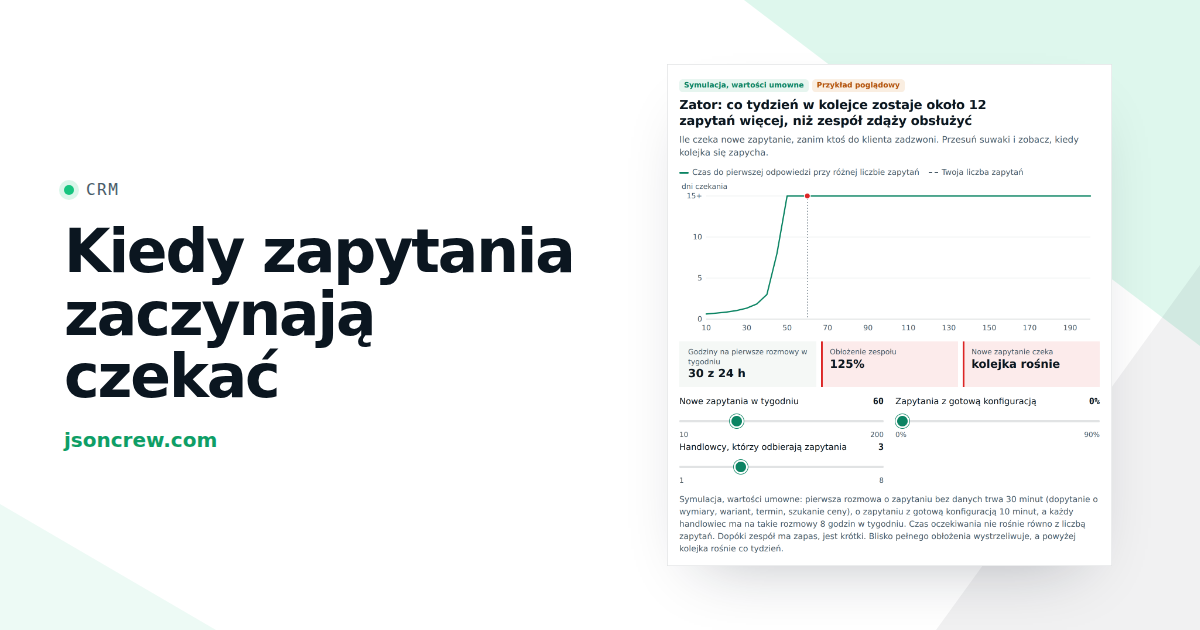
The bottleneck is usually the first conversation. Any inquiry without specifications requires a phone call: what dimensions, what variant, when.
And here is the trap. The waiting time for a response does not increase in line with the number of inquiries. As long as the team has the stock, the inquiry waits a day. When close to full capacity, times jump up, and when there are more inquiries than the team can handle, the queue grows every week. Like in the emergency room when there are a few too many patients.
Lesson for management: As the line grows, more advertising is like admitting more patients into a full waiting room. A shorter first conversation helps (the inquiry comes with a ready-made configuration) or more people during the triage. Only then more inquiries.
Check your CRM: 8-question test
Select what is already working in your company. The result will show the weakest spot and the tool that fixes it.
What to do on Monday
Before you compare CRM price lists, do four things.
- Count the time of the first response. Take the last 20 inquiries and see how many hours passed from receipt to first contact.
- Write down the questions from the first interview. Those that are repeated can be entered via a form or configurator before the phone rings.
- Browse open offers. How many of them don't have a planned next step with a date? Assign each such offer to a specific person.
- Draw a data map. On one sheet: where the price, availability, customer data and order status come from. Each arrow where someone is typing data manually is a place for systems to connect.
When it doesn't work
- Several inquiries a month. If you produce several large installations a year, a decent spreadsheet and calendar may be sufficient. CRM begins to pay off when no one remembers all the opportunities at once.
- No established process. CRM won't invent the process for you. If each salesperson sells in his own way, first establish steps and rules. More about this in the text about, why CRM implementations fail.
- ERP with a CRM module that is already working. If the team really works in the sales module of your ERP, it may be better to refine it than to add a second system.
JSON Hub: what it looks like in our CRM
This is what it looks like in JSON Hub, our own CRM and company management system.
- Entry: you add a new customer using the NIP number, the company's data comes from the Central Statistical Office, and the system warns if the company is already in CRM. We can transfer data from your current CRM for you.
- Qualification: the „My Day” view shows the salesperson who to call, and the „No Next Step” list shows inquiries without a plan.
- Offer: offer as a link instead of PDF. The customer changes the parameters in the calculator, sees the new price and clicks „I accept the offer”. You see when and how many times he opened it. Offers in Polish, English and German, in PLN, EUR or USD.
- Age of Chances and Forecast: the funnel shows the sum and value weighted by the chance of winning at each stage, and a card that has not moved for 14 days gets a red marker. The forecast shows open opportunities by closing month.
JSON Hub does not replace accounting or ERP software. We make the connection to ERP separately integration. If you already have a CRM that your team likes, you don't need to change it: configurator, digital bidding and automation can be connected to it.
Frequently Asked Questions
Which CRM should you choose for a manufacturing company?
One that will handle six things: inquiries with configuration, qualification with supervisor and deadline, offer from the catalog and rules (CPQ module), age of opportunities, forecast from stages and connection to ERP. The brand is secondary. You can find a comparison of specific systems in the CRM ranking for manufacturing companies.
How does CRM for production differ from regular CRM?
A regular CRM conducts contacts and sales. CRM for production additionally understands product variants, accepts specifications from the configurator, makes an offer from pricing rules and uses prices and availability from ERP. Without this, the salesperson rewrites data between systems.
Will CRM replace ERP in a manufacturing company?
NO. ERP runs production, warehouse, orders and accounting. CRM leads the way from an inquiry to a signed offer. They work best together: CRM takes prices, availability and customer data from ERP, and ERP gets the approved order from CRM.
How to start implementing CRM in a manufacturing company?
From measurement, not from choosing a tool: count the time of the first response, write down repetitive questions from the first conversation and check how many offers do not have a next step. This will show whether you first need a configurator, an order in offers or a connection to ERP.
Where to start for yourself
Start with the test 8 questions above: it will indicate the first missing element. When it is order in inquiries, offers and age of opportunities, see what it looks like in JSON Hub. And if you want to check all sales, not just CRM, the „Where is your company stuck?” test. will go through all stages with you.
Where is your company blocking out?
Eight sentences about how your company responds to results. Next to each of them, indicate how often you do this. At the end, you will see what kind of regulator your company is today, what it lacks and where to start.
None of the eight sentences fit your business. This is a good sign: your decision loop is calm. Check it quarterly, because rocking usually begins when the company is growing or the market is changing.
I will send you 10 questions to list one process, with hints for your result
Sent
CEO of Ideo Solutions AS
How to Cite This Article: Jędrzej Siewierski, „CRM for a manufacturing company: six things it must be able to do before choosing a system”, JSON Crew, jsoncrew.com, 2026.
Sources: J. Oldroyd, K. McElheran, D. Elkington, „The Short Life of Online Sales Leads”, Harvard Business Review, March 2011; JSON Hub functions by jsonhub.pl, as of October 2026.
Jędrzej Siewierski, CEO and co-founder of JSON Crew. He builds Product configurators and quoting systems for B2B companies (agricultural machinery, hunting weapons, construction, RES) and JSON Hub, his own CRM with the quote as a page. LinkedIn.