 Maciej Ramus

At a company that makes roller blinds, pleated blinds, insect screens or venetian blinds, the matrix price list is almost never a single file. It is usually several dozen sheets: a separate table for each system, each fabric group, sometimes a separate one for the profile colour and the type of control. The sales department knows them by heart, dealers have them printed out, and every price change means a week of fixing formulas in Excel.
When the decision comes to build a configurator on your website or in a dealer portal, one question settles half the project: do we move the tables over 1:1 or replace them with a formula? This article is for the owner, the sales director or the person responsible for the price list at a window-covering manufacturer. We show both methods with real numbers, with a calculator, and describe how to move 40 tables from Excel into the system so that prices match down to the last zloty.
Where 40 price tables come from
A window-covering price list grows by itself, because every product variable multiplies the number of tables. A typical fabric roller blind manufacturer has:
- systems: free-hanging roller blind, cassette blind, day-night blind, roller blind with side guides, often in 2 to 3 mechanism sizes,
- fabric groups: usually 4 to 8 price groups, from basic fabrics to blackout and technical fabrics,
- profile colours: white included in the price, with brown, anthracite or golden oak as a separate table or a surcharge,
- control: chain, spring, electric motor, battery motor,
- channels: retail price, dealer price, price for a large distributor.
Four systems combined with five fabric groups already make 20 size grids. Add two profile colours in separate tables and we are at 40. Insect screens and venetian blinds have fewer material groups, but more mounting variants instead (frame, sliding, door, pleated, 25 and 50 mm slats).
The problem is not the number of tables itself, but the fact that they are inconsistent. One has a 10 cm step, another a 25 cm step. In one the size is in millimetres, in another in centimetres. In a third, someone manually corrected a few cells after a complaint three years ago and nobody remembers why anymore. We saw the same picture at a PVC window manufacturer with a 47-column Excel sheet.
Matrix price list: how it works and why manufacturers like it
A matrix price list is a grid: width in the rows, height in the columns, a ready price in each cell. The customer gives a size, the sales rep looks for the nearest larger cell and reads off the amount. Surcharges are added separately.
Manufacturers stick with the matrix for several good reasons:
- It reflects the real cost. The roller tube, mechanism and cassette change in steps, not linearly. At a certain width you have to move to a larger mechanism and the price jumps by several dozen zlotys at once. The matrix shows this naturally.
- Dealers know it. Shops and installers have printed tables and can calculate from them without a computer. Changing the method means changing the habits of the entire sales network.
- It is easy to check. Every price can be pointed to in a specific cell. In a complaint or a dispute with a dealer, that is a big advantage.
The drawbacks show up at scale. The matrix does not know sizes outside the grid, every price change means editing hundreds of cells, and rounding to the table step means a 121 cm wide roller blind costs the same as a 140 cm one.
Formula: price calculated from parameters
A formula breaks the price down into components. In its simplest version for a roller blind, it looks like this:
price = mechanism
      + max(area, min. billable area) × fabric group rate
      + width × profile rate (tube, bottom bar)
      + surcharges (colour, drive, installation)
A formula gives prices for every size, including those between cells, and changing the fabric rate by 5% means changing one number instead of 400 cells. It is also a natural fit for products sold per square metre, such as frame insect screens or pleated blinds.
It does, however, have two weaknesses. First, it calculates smoothly where the cost rises in steps, so without extra thresholds it underprices just before a mechanism change. Second, switching from a matrix to a formula changes prices that dealers have known for years. Even if the average comes out the same, individual sizes will be a few percent more or less expensive, and that is enough for a sales rep to get a call asking “why did you raise your prices?”.
Same roller blind, two prices: try it on the calculator
Below is a simple calculator based on a sample price list. The matrix was generated from the same formula at the grid points, yet the results differ, because the matrix rounds the size up to the table step. Change the width to 120, then to 121 cm, and see what happens to the price.
Calculator: the same roller blind, two ways to calculate the price
Sample fabric roller blind price list, illustrative figures (net). The matrix has a 20 cm step and a range of 40 to 240 cm width and 60 to 260 cm height.
Matrix price list
Formula
The takeaway for a manufacturer is not “the formula is better”. The rounding difference is often a deliberately built-in margin that the company lives on. The point is that choosing the method should be a business decision, not a side effect of how someone once laid out a spreadsheet.
Comparison: matrix, formula and hybrid model
| Criterion | Matrix price list | Formula | Hybrid model |
|---|---|---|---|
| Consistency with current prices | 1:1 with Excel | Requires calibration, some prices will change | 1:1 for the base price |
| Sizes between cells | Rounded up to the step | Exact price for every size | Rounded as in the matrix |
| Out-of-range sizes | No price | Calculates, even where it should not | Block or fallback formula |
| Step cost of the mechanism | Built into the cells | Requires thresholds in the formula | Built into the cells |
| Price change of X% | Recalculating all tables | Changing one rate | Multiplier per table plus surcharge rates |
| Surcharges (drive, colour, installation) | Often separate tables | Natural | As a formula or a fixed amount |
| For whom | Few systems, stable prices | Products priced per m², simple systems | Most window-covering manufacturers |
Hybrid model: what works for window-covering manufacturers
For window-covering price lists, the setup that works best is one where each part of the price has its own source:
- Base price from the matrix for each system and fabric group pair. It stays consistent with what dealers know and reflects the step changes in the mechanism.
- Surcharges from rules: profile colour as a percentage or a fixed amount, drive as an amount that depends on width, installation as a per-unit rate. Instead of 40 tables you end up with 10 matrices and a dozen or so rules.
- Channel multipliers: dealer and distributor prices as a discount off the list price, not a separate set of tables.
- Technical constraints kept separate from price: maximum width for a given mechanism, minimum height of a door insect screen, maximum area for a battery motor. The configurator blocks an impossible size before it even starts calculating the price.
This split also makes updates simpler. The pricing team raises the drive rate without touching the matrices, and the product engineer changes the width limit without touching prices. We describe how the same split works in non-serial production in our article Configurator, CPQ and supplier catalogue.
See it in practice: 3D external roller shutter configurator
Below you can try the 3D external roller shutter configurator from our showroom. External roller shutters are a different product family from fabric roller blinds, but they show the same hybrid model, only with a formula as the base price: area times a rate per m², plus step surcharges and technical tables.
- opening size to the centimetre within a range of 60 to 370 cm width and 60 to 300 cm height, because the upper limit is set by the catalogue limit of the 52 mm shutter curtain,
- box selected from manufacturers’ tables (Krishome, Aluplast): the smallest one that fits a shutter curtain of the given height, which is a classic matrix lookup,
- step change of the shutter curtain: when the shutter is wider than 2.8 m or larger than 6 m², the curtain moves from 39 to 45 or 52 mm, and the price changes with it,
- technical rules kept separate from price: a strap works up to 12 kg of shutter curtain, a heavier shutter automatically gets a crank, and a radio motor fits from 78 cm of width,
- fixed-amount surcharges for the mounting method and drive, shown next to each option, plus an indicative price refreshed with every change.
Try it with a size. For a 280 × 150 cm opening, the configurator selects a 39 mm shutter curtain (approx. 12 kg), calculates 4.2 m² at PLN 415 and shows PLN 2,302. Enter 290 cm and the curtain moves to 45 mm (approx. 15 kg), a PLN 108 surcharge is added and the price rises to PLN 2,472. Ten centimetres of width means a PLN 170 difference: in Excel this would mean switching to a different table, here a rule does it.
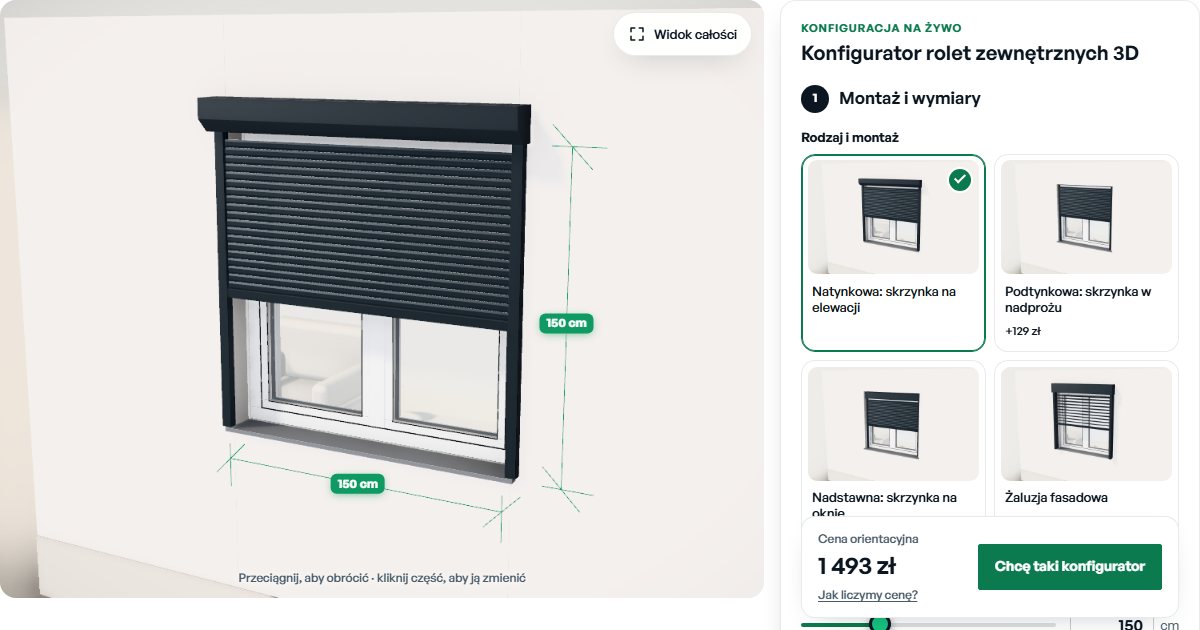
Click to launch the configurator right here in the article. Prefer full screen?
Open the 3D roller shutter configurator in the showroom →
8 pitfalls that trip up window-covering configurators
1. Rounding direction
The sales rep’s Excel rounds up, while the first version of the configurator rounds to the nearest cell. A 129 cm roller blind gets priced as 120 cm and nobody notices for two months. The rounding rule has to be written down explicitly: up, to the nearest larger cell, separately for width and height.
2. Cell boundary
Does 120 cm belong to the “up to 120” cell or the “from 120” cell? Manufacturers’ tables use both variants, sometimes in two sheets from the same company. Tests on boundary sizes (119, 120, 121 cm) must be run for every table.
3. Order size vs window opening size
The customer measures the glass or the recess, while the price list is based on the size of the finished product. The difference is a few centimetres, which often means a different table cell. The configurator has to know which size it accepts and, if needed, add the allowance itself.
4. Minimum billable area
A small insect screen or pleated blind is charged as 1 m² or 0.5 m², because the processing cost is fixed. In a matrix this is hidden in the first cells, in a formula it has to be added. Without it, small orders come out below cost.
5. Order of applying surcharges and discounts
Is the percentage colour surcharge calculated from the base price or from the price with the drive? Is the dealer discount applied to the price with surcharges or without? Each of these decisions changes the price by a few percent. The order has to be written down as a single rule and followed throughout the system.
6. Gaps in the tables
Empty cells usually mean a technically impossible size, but sometimes someone simply forgot to fill them in. During import, every gap should go onto a list for clarification, not be silently replaced with zero.
7. Prices that drop as the size increases
A simple test: in a correct matrix, the price does not drop when width or height increases. When importing several dozen sheets, this test always finds something, usually a typo or a shifted row.
8. Price list versions
A price change on 1 March must not change quotes sent in February. Every price list needs an effective date, and every saved configuration must remember which version it was calculated from. Without this, a sales rep opens an old quote and sees a different amount than the customer.
How to move 40 tables from Excel into a configurator
The technology itself is the simplest part here. Most of the time goes into cleaning up the data, which is why we work in five steps:
- Inventory. A list of all sheets: system, group, colour, channel, unit, grid step, date of last change. At this stage it usually turns out that some tables are unused or duplicated.
- One data format. We convert every table into rows with the same layout: system, group, width from-to, height from-to, price. Sizes in one unit, net prices.
- Automated validation. A script checks for gaps, prices that drop as size increases, overlapping ranges and price jumps larger than a set threshold. The result is a list to clarify with the pricing team, not silent fixes.
- Excel consistency tests. We randomly select several hundred configurations, including boundary sizes, and compare the configurator price with the price calculated the old way. The goal is zero differences, and every difference has a known explanation.
- Update path. The pricing team keeps working in Excel, just in one agreed template. After the file is uploaded, the system shows which prices have changed and publishes a new version with an effective date.
This is what a single price list row looks like after import, regardless of what the source sheet looked like:
{
  "system": "cassette-blind-32",
  "group": "B",
  "width_from": 101, "width_to": 120,
  "height_from": 141, "height_to": 160,
  "net_price": 435.00,
  "price_list": "2026-03",
  "effective_from": "2026-03-01"
}
With data like this, the configurator calculates the price in a fraction of a second, and the same price list can feed the website, the dealer portal and other sales channels. A finished configuration with its price and bill of components can be passed straight to the Customer Relationship Management or to production.
How long it takes and what drives the cost
For a window-covering price list, the schedule depends most on the state of the data, not the number of tables. 40 consistent sheets import faster than 10 laid out in different ways. A configurator for one product family, with a price list, technical rules, a PDF quote and sending to CRM, usually fits into an MVP of 6 to 8 weeks. We covered budget ranges in our article How much does the configurator cost?, and you can check a preliminary cost in our estimator.
If you are wondering whether to build a configurator from scratch or buy an off-the-shelf CPQ, read our comparison of a custom configurator, off-the-shelf CPQ and a template. With non-standard window-covering price lists, off-the-shelf tools often require converting the matrices into their own format, which is the same work, only without control over the result.
Frequently Asked Questions
Can a matrix price list be moved from Excel into a configurator without retyping it by hand?
Yes. Excel tables are imported with a script into a single data format (system, group, width range, height range, price). The only manual work needed is standardising sheets that have different layouts and deciding what to do with gaps in the tables.
Which is better for roller blinds: a matrix or a formula?
For the base price of roller blinds, pleated blinds and insect screens, manufacturers most often stay with the matrix, because that is how they calculate cost and that is how dealers know it. A formula works well for surcharges (drive, profile colour, installation) and for products priced per square metre. In practice, a hybrid model works best.
How should a configurator round a size that falls between table cells?
Always up, to the nearest larger cell, because that is how most manufacturer price lists work. The rule must be written down explicitly and tested on boundary sizes, e.g. 120 cm and 121 cm, because that is where discrepancies with Excel most often appear.
What should happen when a customer enters a size outside the table?
You have to decide up front: a block with a message about the maximum size, a price from a fallback formula, or forwarding the enquiry to the technical department. The configurator should not guess the price, because then the error goes straight into the quote.
How do you update prices in the configurator after the price list changes?
The most convenient way is to upload a new Excel file with the same layout. The system shows the differences from the previous version, and the new price list gets an effective date. Quotes issued earlier keep their prices.
Next step
If you have a price list spread across several dozen sheets and are wondering whether it can be moved into a configurator without changing prices for dealers, send us a product description or one sample table. We will tell you whether a matrix, a formula or a hybrid model will work better, and how much work cleaning up the data requires. Examples of working configurators, including the 3D louvered pergola configurator, can be found in JSON Crew showroom.
Get in touch or see what a configurator implementation looks like, from the first conversation to a working MVP.
Read also
- How much does a configurator cost? Realistic price ranges and what influences the price
- Quotation Chaos in a Manufacturing Company: 7 Signs and How to Spot It
- Configurator, CPQ and supplier catalogue: bidding architecture in non-series production
- ROI from the configurator: how to realistically calculate the return on investment
- Custom configurator vs. off-the-shelf CPQ vs. template: what to choose and when